- 2 Posts
- 21 Comments


From screenshots of having the GUI installed (It’s looking like some sort of Web Config or Printer Settings pave that has toggles for 2-Sided/Duplex printer, as well as playing with the quality of the print jobs. Maybe I was misunderstanding thr purpose of the gutenprint-printer-app
Give it a go, we’re curious, and I’m invested in you overcoming this silly printer hoops-and-loops getting just the basic features ironed out.
Do it. Do it now.
I found it listed under gimp-print.sourceforge.io/p_Supported_Printers.php listed as Experimental. Gutenprint is originally Gimp-Print.
It’s labelled as “Canon MAXIFY MB2750” on that page. In the terminal, what’s the output of:
gutenprint-printer-app devices?
“Fuck Yooouuu Kyocera, and Fuck Yoooouuuu Windoze!!!” -Emporer Akihito, South Park “Whale Wars” reference
Hey fellow Debian Stable penguin, I’m running out of power-ups over here, wondering if you were able to install it and check? Would love to know if it worked better for you, before num-nums and nite-nite time. 22:50 local time here for me.
sudo apt-get install printer-driver-gutenprintThere’s also a Gutenprint GUI installable as a Snap package, that way Debian Stable (for good reason) is timely behind Experimental (which has it).
Check if snap is installed by:
snap --versionIf not installed already, you can run:
sudo apt install snapdThen rerun the above ‘version checker command’ and if all went well, do:
sudo snap install coreAnd then get it into Active state with:
sudo systemctl enable --now snapd.socketThen we make a symbolic link for classic snap support (Arch and Debian systems need this:
sudo ln -s /var/lib/snaps/snap /snapWhew. All’s in place. Now getcha the Gutenprint GUI using snap:
sudo snap install --edge gutenprint-printer-appAnd once it’s snapped into your Debian system, launch it from Terminal with:
gutenprint-printer-appThis is my first comment ever on Lemmy with this many copy/paste code snippets. Hoping it all formatted correctly for ya, and let us know how it goes from here! LOLseas
Name and shame the printer company. That’s infuriating to read.
Gutenprint
https://openprinting.org/driver/gutenprint/
Which distro are you using? GNU/Linux Debian? Debian based distro?
Richard Stallman wept.


 4·4 months ago
Oh man. Second job ever, dipping my toes into IT as a PC tech at an office supplies retail store.
Freshly minted CompTIA A+ hardware/software certification under my belt. Have a customer debate me on me declaring that SDRAM is and always will be faster than DRAM memory. Customer walked out after complaining to my manager. Got chewed out by manager, but kept job, though I was noticeably meeker with future interactions. Retail sucks.
More than 20 years later, I’m still right.
 12·5 months ago
Unless we’re talking about the AMD Starship/Matisse HD Audio Controller and supporting surround 5.1 and above. Going through this headache for years, under Debian. Front Left/Rear Left play audio through just the Front Left speaker, and the same goes for the Right channels. I am not so happy with my PipeWire experience.
I did a huge jump from an AMD Phenom II X6 1055T CPU (6-core AM3 socket) kept in an old gen1 Thermaltake Armor case (think plastic transparent window), my 2012 build. This is my 3rd build ever, and the Thermaltake Armor had to go! I love this 5950x, it’s a beast, and I hope to get 10+ years outta this rig. You?
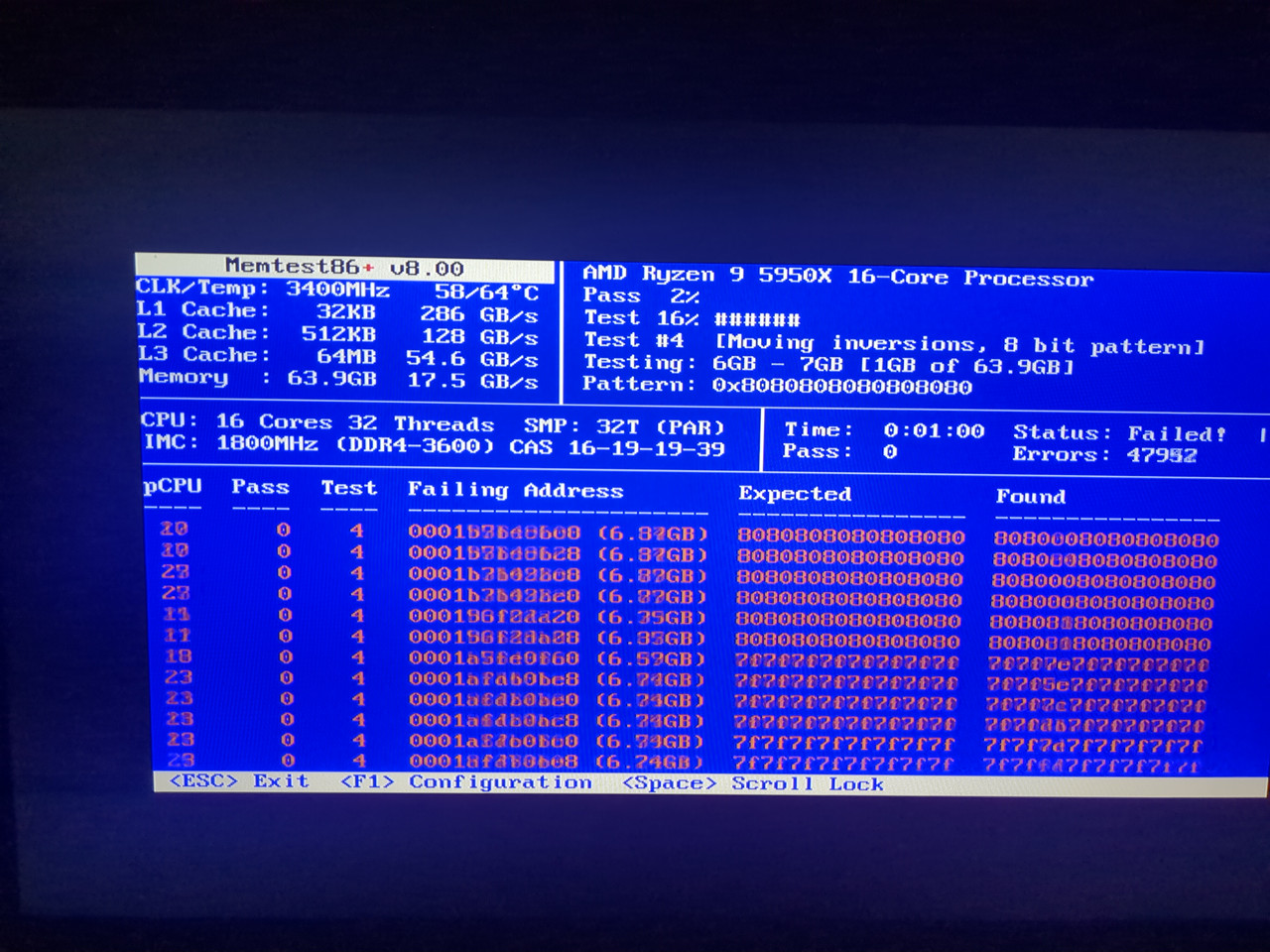
Couldn’t wait to test under MemTest86+… well, looks like they’re fucked:
My MemTest86+ results G.Skill Ripjaws 64GB
Edit: was trying 3600MHz at 1.35V, which was wrong for both values. Need it at 3200MHz at 1.45V and MemTest86+ is happy now. CAS 14-18-18-38
Thanks so much for the swift reply! Reassuring. I’ll be devastated that I’m going from CL14 3200Mhz to CL19 2666Mhz if they want to “upgrade” me. I did a lotta research when piecing my build, and the AMD 5950X has an Infinity Fabric of 1:1 at CL14 3200Mhz. I wanted the absolute best baseline, GPU-excepted. Sowing down ain’t for this build.
What state if you don’t mind me asking? I lived in FL, TX, MD, and PA before jumping The Atlantic Ocean a few years ago.
I’m thinking my G.Skill 64GB set I bought in 2025 is crashing my PC. Gonna run a MemTest86+ overnight to check. Rated for 1.45V and up to DDR4-3200 with the XMP profile- PC crashes under load just minutes into a fresh reboot.
This said, an equivalent 64GB kit of their DDR4 CL19 (F4-2666C19D-64GVK) is retailing at the store I bought my original CL14 Ripjaws for €753. I bought the CL14 faster 64GB kit (F4-3200C14D-64GVK (EOL)) for €177.45 So SHIT I don’t know how G.Skill is going to handle my situation, if MemTest86+ fails out at the 3200MHz stress test (on their official site, they declare that my possibly defective F4-3200C14D-64GVK (EOL) can reach 3200MHz with a small bump up of voltage to 1.45V, up from stock 1.2V).
How did it play out for you, with their Limited Lifetime Warranty? I’m in the EU.

Great question: I tried it last year, the app launched, asked my credentials, then just stalled out. No error, no progression timer or animation, just sat there. So in my case, even with a secondary account on my GOS phone, with the sole intention of getting my bank’s app working: no.
One of the only complaints I have, after using GoS for the past 2 phones, is that my bank requires Google’s Play Integrity software to run on the phone, for the bank app to work. So, the bank sent me a physical pocketable scanner to use with the mobile web version. Works for now. Annoying additional bit of hardware kit to not forget home. Other than that, I love GOS.

We uh… NEED you, in dire way, to elaborate on this. Right now.
sudo snap remove gutenprint-printer-appThen
sudo apt purge snapdSorry I couldn’t be the fixer here. No disrespect meant, just trying to help. LOLseas